

Failed to generate a user instance of SQL Server due to a failure in starting the process for the user instance. The connection will be closed.
Like most ASP.NET developers I also first installed SQL Express 2005 together with visual studio.net 2005. After a while however I decided to get it off my dev laptop and install the full blown SQL Server 2005 instead because I wanted to test against this database and because I also needed it for an internal course at work. Things went fine, I also played around with the aspnet_regsql tool to make a dedicated database for my ASP.NET 2.0 services like Membership. I even changed the default setting for the LocalSqlServer connection string in my machine.config file in order to not be forced to override that setting in each new webproject I created.
After a while I felt the urge to reïnstall SQL Express 2005 because I downloaded several example sites and starter kits. Although it’s quite easy to attach a .mdf file to SQL Server 2005, you can read my blogpost about it here: Attaching a .mdf file when you don’t have the .ldf file available.
The installation went smoothly, I could see the extra database in SQL Server Management Studio but when I wanted to add a new local database, ie SQL Express database, in the App_Data subfolder of a web project I got this error:
“Failed to generate a user instance of SQL Server due to a failure in starting the process for the user instance. The connection will be closed.”
Huh?
Well I search around, gained some knowledge about the problem and thought I share it with you:
First you’ll need to open up SQL Server Configuration Manager. Navigate to that in the menu like Microsoft SQL Server 2005 > Configuration tools > SQL Server Configuration Manager. Take a look at figure 1:
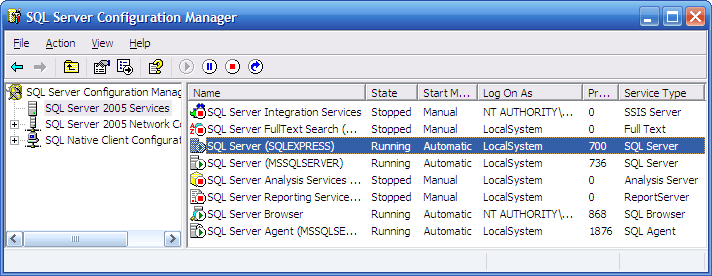 Figure 1: The SQL Server Configuration Manager tool.
Double click, or right click and choose Properties, of the selected line and you’ll get the properties window which you can see in Figure 2:
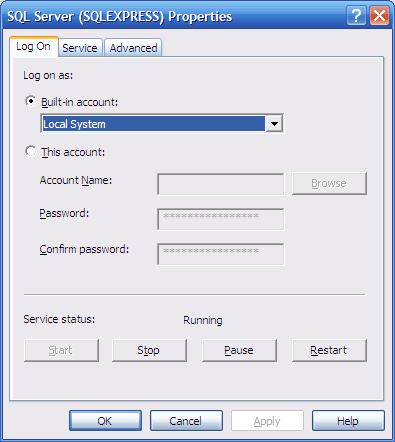 Figure 2: The properties window
You’ll need to make sure that the Local system is selected.
The second part of the solution’s to delete the following folder on your hard drive: c:\Documents and Settings[user]\Local Settings\Application Data\Microsoft\Microsoft SQL Server Data\SQLEXPRESS(/images/1). This folder’s used to store information and apparently it messes up the proper working of SQL Express.
Grz, Kris.
(/images/1): http://forums.microsoft.com/msdn/showpost.aspx?postid=98346&siteid=1
Leave a Comment