

Autonumbering ASP.NET grid controls.
I read this kind of questions multiple times on the $blank(/images/forums.asp.net,ASP.NET forums). Most of the time it’s suggested that one can use one of the events of the grid control they’re using to use the FindControl method to find a Label control in one of the template columns and add the current row number to its Text property. I also used to do it like that when I started with ASP.NET.
However it can be done easier, and in markup, without the use of events, and best of all, the grid controls(/images/1) of ASP.NET support the technique.
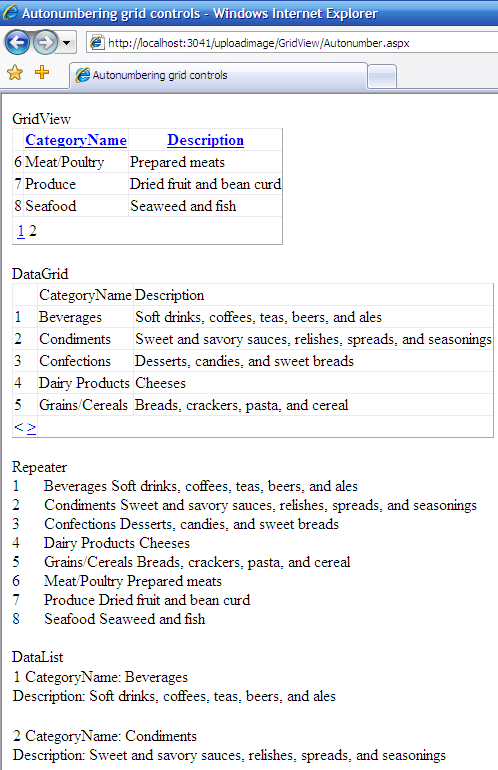 Figure 1: The GridView, DataGrid, Repeater and DataList controls shown to present the technique.
If Figure 1 you can see that it also supports pagination, which is shown in the GridView control.
Code says more than words so here goes:
1 <%@ Page Language=”C#” %>
2
3 DOCTYPE html PUBLIC “-//W3C//DTD XHTML 1.0 Transitional//EN” “http://www.w3.org/TR/xhtml1/DTD/xhtml1-transitional.dtd”>
4
5
6
7 protected void DataGrid1_PageIndexChanged(/images/object source, DataGridPageChangedEventArgs e)
8 {
9 DataGrid1.CurrentPageIndex = e.NewPageIndex;
10 DataGrid1.DataBind();
11 }
12 script>
13
14 <html xmlns="http://www.w3.org/1999/xhtml" >
15 <head runat="server">
16
17 head>
18 <body>
19 <form id="form1" runat="server">
20 <div>
21 GridViewdiv>
22 <asp:GridView ID=”GridView1” runat=”server” AllowPaging=”True” AllowSorting=”True”
23 AutoGenerateColumns=”False” DataSourceID=”SqlDataSource1” PageSize=”5”>
24
25
26
27 <%# Container.DataItemIndex + 1 %>
28 ItemTemplate>
29 asp:TemplateField>
30
31
32 Columns>
33 asp:GridView>
34
35 DataGrid
36
37
38
39
40
41 <%# Container.DataSetIndex + 1 %>
42 ItemTemplate>
43 asp:TemplateColumn>
44 Columns>
45 asp:DataGrid>
46 Repeater
47
48
49 <%# Container.ItemIndex + 1 %>span>
50 <%# Eval(“CategoryName”) %> <%# Eval(“Description”) %>span>
51 ItemTemplate>
52 asp:Repeater>
53 DataList
54
55
56
57 <%# Container.ItemIndex + 1 %>
58 CategoryName:
59
60 asp:Label>
61 Description:
62
63 asp:Label>
64
65 ItemTemplate>
66 asp:DataList>
67 <asp:SqlDataSource ID=”SqlDataSource1” runat=”server” ConnectionString=”<%$ ConnectionStrings:NorthwindConnectionString %>”
68 SelectCommand=”SELECT [CategoryName], [Description] FROM [Categories]”>asp:SqlDataSource>
69 form>
70 body>
71 html>
For simplicity I used the SqlDataSource control that ships with ASP.NET 2.0 and used the Northwind database (/images/lines 67 - 68). The following lines are of importance: 27, 41, 49 and 57. The + 1 is added each time because of the zero based index.
As you can see, it’s each time a very simple addition to the markup of the grid control you’re using but it adds that nice extra touch of information that endusers like to see.
Grz, Kris.
(/images/1): I tested it upon the GridView, DataGrid, DataList and Repeater controls.

Leave a Comment